
Making Business Easier: AndroidPOSKenya’s POS Thermal Receipt Printer

Running a business is all about being quick and efficient. That’s where AndroidPOSKenya’s POS Thermal Receipt Printer steps in to lend a helping hand. This incredible device is a game-changer for businesses in Kenya, including shops, restaurants, and hotels, helping them operate faster and smarter. Let’s dive into the ways it can supercharge your business.
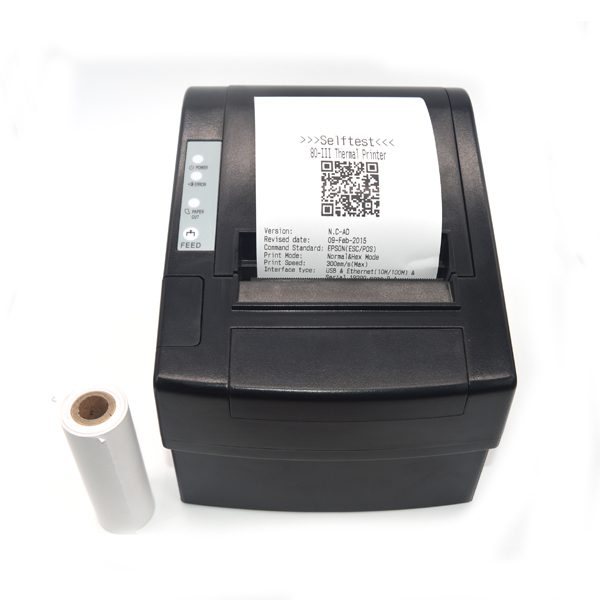
Meet Your Super Assistant
AndroidPOSKenya’s POS Thermal Receipt Printer, also known as the Super Printer, is like a superhero for your business. It’s a specialized printer that can create receipts, tickets, and bills with ease. It’s compatible with various computer systems, including Windows and Android, making it an excellent fit for businesses of all types and sizes.

thermal receipt printer 2

Awesome Features
- Multilingual Magic: This printer can speak many languages, ensuring that all your customers can understand their receipts.
- Sleek and Stylish: Not only is it a workhorse, but it also looks sleek and modern, adding a touch of style to your business space.
- Budget-Friendly Printing: It delivers high-quality printing without breaking the bank on costly ribbons and ink cartridges.
- Cash Drawer Compatibility: For businesses using cash drawers, this printer seamlessly integrates with them.
- User-Friendly Design: Putting paper in and taking care of the printer is hassle-free.
- Eco-Friendly Operation: It’s energy-efficient, reducing both your operating costs and environmental impact.
- Always Ready: The printer can keep receiving information and printing simultaneously, ensuring smooth operations.
- Customization Options: You can adjust the size, boldness, and spacing of characters to fit your needs.
- Image Integration: Adding images to receipts is a breeze, making them more visually appealing.
- Image Downloads: You can easily import images from your computer and print them on receipts.
- Crystal-Clear Printing: The printer produces sharp and detailed images.
- Speedy Printing: It offers rapid printing across all computer interfaces.
- Universal Compatibility: This printer works seamlessly with a variety of computer systems.

Where Can You Use It?
You can put this printer to work in a wide range of settings:
- Restaurants: Simplify order taking and bill printing.
- Supermarkets: Keep track of sales and provide customers with professional receipts.
- Hotels: Streamline check-in and check-out processes for guests.
- Shops: Generate receipts and invoices quickly and efficiently.
- Coffee Shops: Speed up bill printing, ensuring customers can enjoy their coffee without delay.
- Service Centers: Manage service bills and keep track of repairs with ease.
- Fast-Food Establishments: Expedite the order process and payment for fast food.
- Spas and Entertainment Venues: Streamline invoicing and payment processes.
- Banks: Quickly print transaction receipts for customers.
- KTVs: Simplify payment and billing for entertainment venues.


How It Works
Here’s a simplified breakdown of the technical specifications:
- Printing Method: It uses thermal printing, which is efficient and cost-effective.
- Printing Speed: It can print rapidly, saving time for your business.
- Connectivity Options: You can connect it to various types of computers, either through cables or wirelessly.
- Automatic Paper Cutting: The printer can neatly cut the paper after printing.
- Power Consumption: It’s energy-efficient and won’t cause a significant increase in your electricity bill.
- Cash Drawer Integration: It can work with cash drawers, making your point-of-sale process seamless.
- Paper Size: It uses a specific paper size, ensuring consistency in your printed materials.
- Operating Conditions: It performs best within a specific range of temperature and humidity.
- Paper Thickness: It’s compatible with a standard paper thickness range.
- Paper Roll Size: It uses rolls of paper with a specific size, ensuring a steady supply.
- Compact and Lightweight: It won’t take up much space and is easy to handle.
- Compatibility: It’s designed to work with various computer types, offering flexibility.
- Reliability: This printer is built to last, providing you with dependable service.
In Conclusion
AndroidPOSKenya’s POS Thermal Receipt Printer is more than just a machine; it’s a trusted partner for your business. It streamlines operations, enhances efficiency, and provides top-notch customer service. Plus, there’s a fantastic offer available right now—a generous 8% discount, with an additional 10% instant discount if you use a VISA card during our limited-time bank offer. Now is the perfect time to supercharge your business with AndroidPOSKenya’s POS Thermal Receipt Printer, your ultimate business ally!

ANDROIDPOSKENYA
eTIMS – Android POS, PDQ, ETR machines, Bluetooth Printers. Your Most Trusted Shop in East Africa. Deliveries Possible to all EA countries.